Budgeting can be hard, especially if you don’t know how to start tracking tracking where your money is being spent.
A budgeting app can help you by building a budget and figuring out where all your hard earned dosh is going. There are thousands of free budgeting apps available nowadays. Deciding which one can choose can be overwhelming!
Luckily, I’ve spent the past month budgeting (excessively) across all the recommended apps I could find to select my three favorites for students:
Pocketbook, Everydollar, and MoBills. These apps were chosen based on their usability, features, and tested religiously by yours truly. They are all free and accessible, because managing your money shouldn’t cost money (duh).
If you're too hipster for a fancy app, check out this free spreadsheet template.
Easy to use: Pocketbook
A popular, accessible Australian budgeting app with integration available for most banks. Works across platforms and syncs with all accounts so you can track your finances wherever you go. You can even set a pin to keep any unwanted guests out of your finances.

When it comes to budgeting, Pocketbook does all the hard work for you.
Simply connect the app to your bank account, and view transaction break downs by week, month, or even annually.
Pocketbook pros:
- FREE and super easy to use
- Seamless integration with most Australian banks
- Safety spend and smart notifications encourage you to stick to a budget.
- Custom categories and automatic categorisation
- Detects income and upcoming bills
Pocketbook cons:
- No integration available for People’s Choice Credit Union and a few other banks
- You need to hand bank details over to a third-party
- Sometimes assigns wrong categories to bank transactions
- May become forgettable after a few weeks of use
Pocketbook breaks down your spending habits by category, detects bills, and tracks your income automatically. All this information is delivered beautifully and logically in an easy to use app.
Manual transactions are available if your bank isn’t supported, or if you don’t want to connect your account to Pocketbook.
Pocketbook is free to download on Android and Apple. Visit getpocketbook.com to learn more.
My personal favorite: EveryDollar
Created by Dave Ramsey’s company, EveryDollar is a relatively new budgeting app available online, on Android, and IOS.

EveryDollar requires manual entry and has no bank integration. However, it is one of the easiest to use and perhaps the most beautiful.
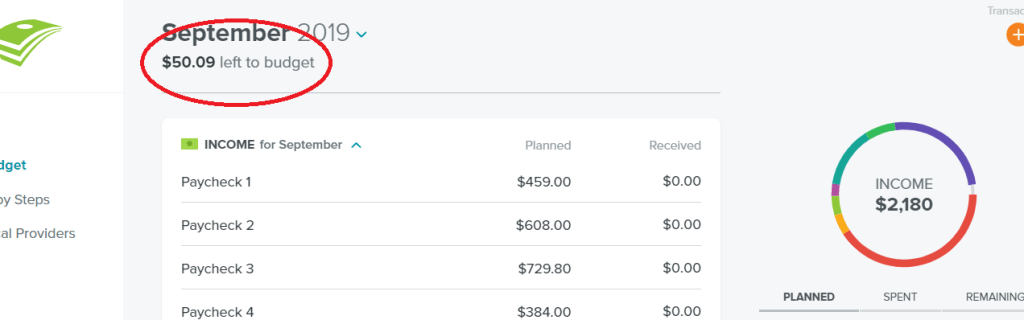
Income for each month is entered at the top of your budget. The ‘expected’ and ‘received’ options are helpful for people with volatile incomes, like casual workers.
Expenses are tracked by category and can be customised to suit your needs. Once expenses are entered, the budget is broken down visually, and by percent for the month. This breakdown is great for tracking monthly expenses at a glance.
While the basic version of EveryDollar is free, EveryDollar plus is $130 a month and offers features like bank connectivity, email support, and more. It certainly isn’t worth paying for the premium version. There are many great free alternatives.
EveryDollar Pros:
- Clean, beautiful layout
- Custom categories
- Visual breakdown of expenses
- ‘Baby Steps’ tab helps you set goals and learn more about the 7 steps.
EveryDollar Cons:
- Manual budgeting, no bank integration
- ‘Local providers’ tab tries to sell you services
- Limited free version
- EveryDollar Plus is expensive and not worth it
The “Baby Steps” tab beneath your budget provides a breakdown of Dave Ramsey’s 7 Baby Steps to Financial Freedom. These are essentially the basic steps that Scott Pape (The Barefoot Investor), and many other financial advisers approach budgeting with. Alongside these steps, there are a few other financial resources like blog posts.
While this tab is good for distilling the 7 steps into bite-sized pieces, you shouldn’t gather all your advice from one place.
The ‘local providers’ links customers to insurance, tax, and financial advisers. EveryDollar likely receive an affiliate or sales commission from this, which isn’t necessary a bad thing. However, EveryDollar should clearly disclose that they receive commission (if this is the case)
Everydollar is a zero-based budgeting app, meaning that income minus expenses should equal zero by the end of the budget cycle.
Good for budgeting beginners: MoBills
MoBills is another free app with a polished, well-organised layout. While some of its features are only available if you upgrade to Mobills Premium, I would highly recommend this to those who want to start budgeting.

Users enter their expenses and income with the click of a button. From here, Mobills breaks down expenses, displays savings, and tracks monthly budgets. All this information is conveniently shown on the dashboard.
The dashboard is fully customisable. You can add trends, graphs, credit cards, and much more. Looking for motivation to stay within your budget? Add motivational quotes or financial goals to the Mobills dashboard.
Mobills is great for beginners because it tracks expenses, credit card debt, bills, goals, and more. Notifications about spending and budgeting will be sure to help you stay on track and keep budgeting.
MoBills pros:
- Simple and easy to use
- Customisable dashboard
- Track bills and savings
- Import and export spending data
- Lock the app with pin or fingerprint
- Track expenses by location (helpful on holidays)
MoBills cons:
- Cap on number of budgets, credit cards, and accounts for free users
- Cannot use custom tags and filters unless you upgrade
- No bank connectivity
- Limited usability for free users
MoBills premium is $6 a month or $40 a year and offers extra features like un limited accounts.
I wouldn’t pay for a budgeting app. There are so many free apps available. Besides, spending $6 a month on budgeting means $6 less in your savings account(!), which is kind of ironic.
But if I was going to pay for a budgeting app, I would choose MoBills. The features are plentiful and the constant notifications will ensure you don’t forget about this app.
Honorable mentions
How do you budget? Do you have a favorite app to use? Let me know below!
- Mint – Everyone loves Mint. It is one of the oldest and most popular budgeting apps out there. Unfortunately, it is only available on Apple and so it didn’t make my list.
- MoneyLover – Egotistical name aside, this app is another solid option if you want to do more than budget. It helps you track debts, savings, spending trends, and much more. Unfortunately, MoneyLover is saturated with ads from predatory financial companies and so it didn’t make my list.
- Google Sheets / Microsoft Excel – Technically not apps, but these are great options if you’re dedicated enough to create and maintain your own budget. Google Sheets is free and cloud-based, perfect for budgeting!
Freebie: annual budget spreadsheet template
Click here to download the budgeting template that I use for free. No signup or BS.
 avacadomoney.finance.blog